Module 6.1 Finding authentic information in a socially networked world

A few years ago at an ECIS librarian’s conference I heard Joyce Valenza speak about using Twitter as a way to connect students with real world situations. She spoke about the Arab spring and the protests in Egypt and how one of students started to follow a hashtag and found a teenager tweeting from within the protest movement. It was very powerful learning and connecting for her students. During the same study the students also found some rogue twitter handles that seemed to belong to prominent world leaders but actually were fake accounts. The students and teachers together worked on ways to identify authentic and fake twitter accounts of these leaders.

It is not everyday that we are actively researching about current world events but as a recent article in the Huffington Post pointed out “When a Twitter exchange between Nicki Minaj and Taylor Swift can become the subject of national debate, knowing who’s really posting — or who really isn’t – matters” (Fitts, 2015). So when twitter was being used in the classroom to follow a presidential campaign (Journell, Ayers, & Walker Beeson, 2014, p. 53) hopefully the teachers are also guiding their students to ask questions about the validity of the sources of the tweets and to be responsible tweeters themselves.

With more people being able to create content credibility of information found on social networking sites is a real concern. People seek information about medical problems on question sites such as Quora but are the people answering the questions qualified to answer them? Health professionals are discussing ways to ensure medical information found on specific health concerns websites and forums can be trusted. Creating profiles of the contributors is one solution that is being discussed (Hajli, Sims, Featherman, & Love, 2015, p. 248).

Wikipedia the most famous of all crowd sourced encyclopaedia also needs to be treated as an overview or a starting point on a topic rather than a base for serious research (Ghose, 2015). More serious scholars are taking ownership of articles but people still need to check the credibility of the source of the information.

So based on the three articles I read from the module (marked with an asterisk in the reference list below) the two essential take-home messages are when using information found through social media

  • Be a skeptic. Ask WHO is posting this information? (“Authenticating Information,” n.d.). Check their credentials, even go as far as to ask are they really who they say they are. Check the basis for the person’s authority (“Evaluating Sources,” 2015).
  • Be responsible. Check on the validity information before passing it on. That may put Snopes out of business but it is the right thing to do.

References

Authenticating information. (n.d.). Retrieved January 18, 2016, from http://mediasmarts.ca/internet-mobile/authenticating-information

Evaluating sources. (2015, December 22). Retrieved January 18, 2016, from http://guides.library.jhu.edu/c.php?g=202581&p=1334914

Fitts, A. S. (2015, April 8). It’s easier than ever to impersonate a celebrity online — and we’ve all been duped. Retrieved January 18, 2016, from Huffpost Tech website: http://www.huffingtonpost.com/entry/instagram-celebrity-impersonators_55bbc26be4b0d4f33a02c3d7

*Ghose, T. (2015, August 20). Can you trust wikipedia on science? Retrieved January 18, 2016, from Live Science website: http://www.livescience.com/51926-are-wikipedia-science-pages-trustworthy.html

*Hajli, M. N., Sims, J., Featherman, M., & Love, P. E. (2015). Credibility of information in online communities. Jounral of Strategic Marketing, 23(3), 46-72. http://dx.doi.org/10.1080/0965254X.2014.920904

*Journell, W., Ayers, C. A., & Walker Beeson, M. (2014). Tweeting in the classroom: Twitter can be a smart instructional tool that links students with real-time information and connects them to authentic discussions beyond school walls. Phi Delta Kappan, 95(5), 53. Retrieved from Expanded Academic ASAP database.
Module 5.3 Developing a social networking strategy for our school library

Effective social networking takes time and planning (Solomon, 2013, p. 24). It is important to know what you want to achieve with the use of social media. Having measurable goals helps establish the purpose of the use of time and resources in maintaining a presence on social media (Ramsey & Vecchione, 2014, p. 76). Once the goal is established then it is possible to select the best social media tools for the purpose, create some steps to implement the plan and also have a way to measure success.

Istanbul International Community School (IICS) has just over 600 students ages ranging from 3 to 18 years old. It serves an expat community with families from all over the world. The library team has one Teacher Librarian and three assistants.  Any social media strategy for the library has to be sustainable and realistic in terms of whom we are trying to reach and the amount of time required developing and maintaining our presence.

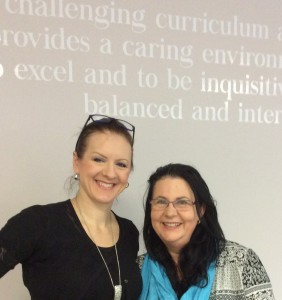
Jennifer Gokmen and Amanda Bond

Jennifer Gokmen and Amanda Bond

Our school already has a closed Facebook group. This group is for parents and students of the school, alumni and friends of the school. It has a public twitter handle @iics1911. These social media tools are maintained by the school’s marketing team, headed up by Jennifer Gokmen. Jennifer monitors Facebook posts and actively retweets school related tweets. The main audience for the school twitter and Facebook accounts are the parents.

Instead of creating a separate Facebook page and dedicated twitter account I think it is a good idea to participate actively within the existing school accounts. Our library posts can add to the school social media presence while at the same time highlighting our programmes and services. We can be passionate partners in our wider school social media efforts (Ramsey & Vecchione, 2014, p. 78). Also since we will be using our personal twitter handles and Facebook accounts to complete the posts this will help our audience identify the library staff in the school, they will see us as professionals who communicate with pride about our work.

While we do have some parents as library members and regular borrowers we would like to communicate with our parents to show them the programmes and services we provide for our students and their families. The Pew report into parents’ views about libraries found that the majority of parents with children younger than 18 years of age feel that libraries are very important for the children as they develop as readers and researchers (Miller, Zickuhr, Rainie, & Purcell, 2013, p. 2). To have a goal that involves more “buzz about the library” (Solomon, 2013, p. 15) is appropriate. Social media will provide one way to spread news and build relationships (Burkhardt, 2010, p.10) with our parents.

The strategic plan should include the goal, who is involved, an assessment date, action items and how the goal will be measured (Steiner, 2012, p.56). Our social media strategy should include all these things and also have a desired frequency of posting. Below is a draft of a marketing strategy for our library using these ideas and guidelines.

 Appendix   Draft marketing strategy for IICS library

Goal

Increase parent and colleague awareness of library programmes and services

People involved

Teacher librarian and anyone in the library team who will commit to the goal.

Assessment date

End of the school year – June 2016

Action Items

  1. Post to twitter daily about IICS library during the working week.
  2. Use @iics1911 and #iicsreads #iicslib #love2read and/or #pypchat with each tweet.
  3. Post once a week to Istanbul International Community School closed Facebook group about library matters and include relevant hashtag.
  4. When posting to the library blog tweet using the hashtags above with the link to the blog post.
  5. Retweet and share colleagues’ posts about the library.

Measures

  1. Fill in Google Doc on Monday morning showing tweets, FB posts, retweets, favourites, likes and shares.
  2. Anecdotal evidence from parents and colleagues about things seen on social media
  3. Increased page views on Blog

Time frames

Start 18th January and evaluate February 29th (first Monday after the break) and April 25th  (first Monday after Spring break) to check and discuss progress.

References

Burkhardt, A. (2010). Social media: A guide for college and university libraries. College & Research Libraries News, 71(1), 10-24. Retrieved from ProQuest database. (Accession No. ISSN: 00990086)

Miller, C., Zickuhr, K., Rainie, L., & Purcell, K. (2013, May). Parents, children, libraries and reading. Retrieved from http://libraries.pewinternet.org/2013/05/01/parents-children-libraries-and-reading/

Ramsey, E., & Vecchione, A. (2014). Engaging library users through a social media strategy. Journal of Library Innovation, 5(2), 71-82. Retrieved from ProQuest AP Science database.

Solomon, L. (2013). The librarian’s nitty-gritty guide to social media. Chicago: ALA Editions, an imprint of the American Library Association.

Steiner, S. K. (2012). Strategic planning for social media in libraries. London: Facet.

Module 3.2 Good short things – tweets and twitter

#iicsreads

#iicsreads

“Good things, when short, are twice as good.” Baltasar Gracian #twitterquotes (Collins, 2009)

 While I do follow some useful Twitter accounts I find the hashtags are the most useful way to follow events or broadcast to a group of people with similar interests. During conferences I tweet using the official conference hashtag. I often read back using the hashtag to see what my colleagues have noted or commented on. A hashtag can connect you with  a group of like minded professional such as #tlchat which Teacher Librarians (TL) around the world use (Valenza, 2010). This particular hashtag not only collates posts from some leading TLs but it is now used for regular monthly discussions on topics with one session ‘live’ (TLChat Live, 2015). There are many blog posts giving TLs guidance on how to tune in to valuable discussion about their work  (Rodriguez, 2014).

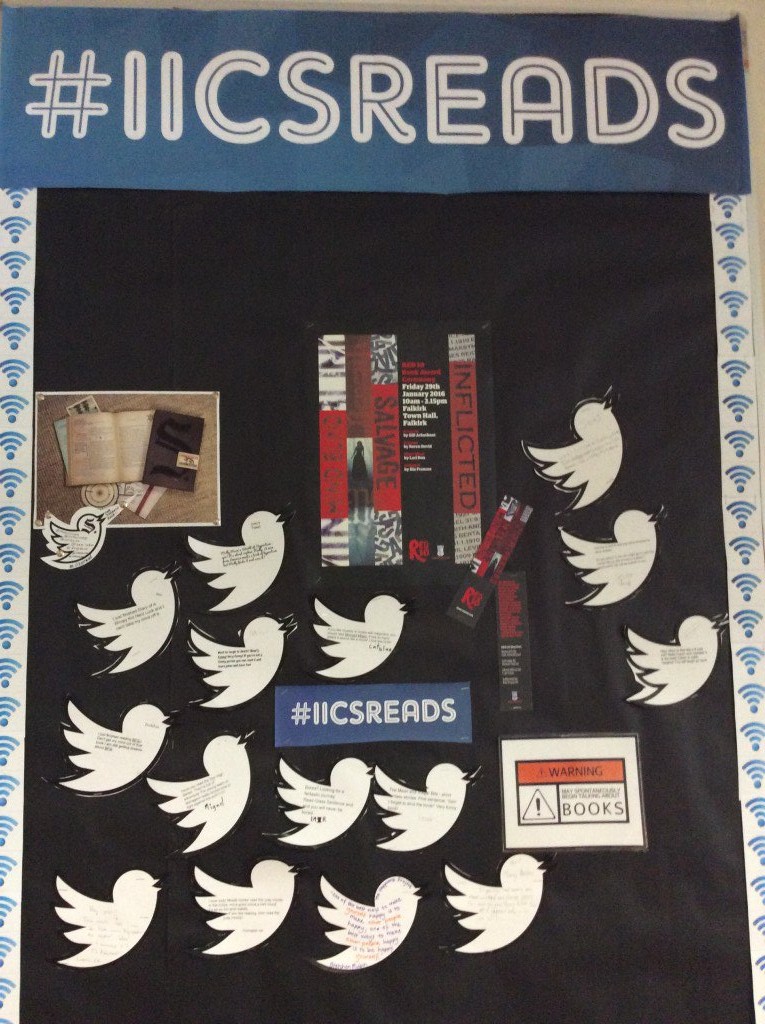
At the moment our Professional Learning Community (PLC) is focusing on how to buld a school culture of independent reading and our hashtag is #iicsreads. Not only do we tweet articles and photos to that hashtag as members of the PLC our students are using noticeboards with that hashtag to write up their reading quotes and tweets by hand.

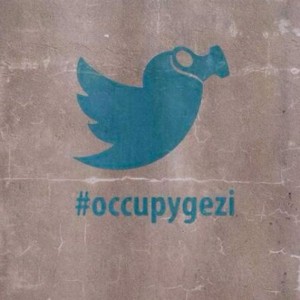
occupygezi_3_0

(Kayabali, 2013)

 One twitter hashtag my colleagues and I followed throughout the months of May and June in 2013 in Istanbul was #occupygezi. We all lived within a five minute walk of Gezi Park and Isitklal Cadessi. Both these areas saw clashes between protesters and riot police. There were clouds of tear gas, fireworks used as weapons and many people were injured. Each day we would follow the hashtag to see what protests were planned, see photos and video footage. We would decide on the safest route to walk home from the bus and alert each other as to what might be happening on our own streets next. Twitter was used as a way for the protesters to communicate with one another.

I do of course follow some key people, Joyce Valenza, Jude O’Connell and Ewan McIntosh are a few people I have had the privilege of hearing speak at conferences (a great source of people to follow). School Library Journal, Mashable, Scholastic, Awesome stories all constitute great sources of tweets. Then there are your favourite authors – many of whom are on twitter now as well.

At first I was worried about missing someone’s important tweet – the twitter sphere is very noisy at times. Then I was introduced to paperli. Paperli is a free web tool which uses the twitter content you are interested in and creates a daily paper  (Paperli, n.d.). I have created my own daily paperli called “Librarybond” which curates my entire twitter feed. This year I created a new paperli for middle students following current events “News and Current Events Daily”.

Follow, hashtag, curate and retweet – twitter is a way to stay up date with breaking news in your neighbourhood and trends in your professional life.

References

Collins, T. (2009, June 5). “Good things, when short, are twice as good.” Baltasar Gracian #twitterquotes [Tweet]. Retrieved from https://twitter.com/TheLittleBookOf

Kayabali, Y. (2013, July 31). [Gezi park protest twitter bird]. Retrieved from http://www.creativereview.co.uk/cr-blog/2013/july/protest-art-in-real-time/

Paperli. (n.d.). Save Time and Money. Retrieved December 1, 2015, from http://paper.li/learn-more.html

Rodriguez, M. (2014, May 27). Top Twitter Hashtags for Librarians. Retrieved from http://hacklibraryschool.com/2014/05/27/hashtags/

TLChat Live. (2015, November 10). https://twitter.com/TLChat [Tweet]. Retrieved from https://twitter.com/TLChat

Valenza, J. (2010, December 30). For newbies: Just Heart the (#) Hashtag! [Blog post]. Retrieved from Never ending Search website: http://blogs.slj.com/neverendingsearch/2010/12/30/for-newbies-just-heart-the-hashtag/

Social networking – beginning INF506

Social Networking
Social networking is about sharing. On social networks people can come together and share ideas, information, stories, photos, videos. Social networking is about people connecting with others through digital tools.

Networking technologies most frequently used

Facebook I try to keep Facebook for my personal life; however, many of my friends are also my colleagues. My timeline is filled with articles about libraries and technology in between friends’ family and travel photos. I post library information on our school Facebook page as it is used by our parents.

Twitter I use Twitter as a professional learning tool, following note worthy colleagues. I discovered Paperli a website takes your twitter feed and turns it into a daily newspaper. I can scan the headlines, read what I am interested in without feeling like I might miss something important. This year I created a current events paperli as a trial for our middle school students.

Diigo I save websites and articles on this bookmarking website daily. We have been using Diigo with our debate teams as a research tool. All members of the team belong to the group and share articles and discuss them through Diigo. Our Professional Learning Community is now using this tool to share websites and articles.

Youtube I have been creating i-movies to showcase visiting authors, battle of the books and aspects of learning in our library. This year I have been using Screencastomatic to show students how to use Noodletools, EBSCO and our online catalogue Destiny.  I post these videos to Youtube.

 Google We are a Google school and use almost the entire Google suite of tools for collaboration and organisation.

Good Reads and LibraryThing Our Istanbul Librarians’ Network has a monthly book chat meeting and we record all the books we chat about on our group page. Our February book chat meeting was held on Google Hangouts due to a snow storm. We recorded it and posted it to the group page. I use Librarything to record all the books I read so I can remember titles when I am recommending books to students.


Learning in INF506
I would like to learn how to harness social network technologies to promote the work of our library. I want to let our community know about the great resources we have in the library and how they can access them. I think social networking is a way to achieve these goals.

Content curating – so many ways

Website content curation is something I have always wanted to explore but it seems so daunting at times. One of the librarians I follow is Joyce Valenza. She has such detailed libguides which she makes freely available through her library website.

One I think is of most value to us in our Masters studies is her Masters course libguide found at:

http://libraryschool.libguidescms.com/content.php?pid=324183&sid=2771792#

She is using present.me to make video slide shows about the topics she is lecturing. I viewed the one on curation tools. She also has the TL libguides for all TL’s to use TLguides http://libraryschool.libguidescms.com/friendly.php?s=tlguides


What I didn’t realise is that I am already in some way curating content. As I watched Valenza’s webcast I saw two methods I use now and which are very easy to maintain. I use Diigo as an online bookmarking tool. My library is https://www.diigo.com/user/librarybond We have also used Diigo with our high school speech and debate team and in the various committee I participate in Academic Integrity  is one of them. I like Diigo because you can add a tool to your web browser and simply click on it when you want to add something to your library. I have my Diigo account syncing with me Delicious account as well.


My newspaper - librarybond

My newspaper – librarybond

I also use twitter and while I found it a great tool for following people I found all the tweets overwhelming at times until I discovered paperli. I have my own newspaper librarybond using the tweets I receive. It is emailed to me each morning and other people can subscribe to it as well. I read the headlines as you do with any newspaper and select the best, most interesting articles to pass on to colleagues or to add to my Diigo library.

When looking for other curation sites I found this article

http://www.prdaily.com/Main/Articles/15_topnotch_content_curation_tools_15378.aspx 15 tools for curation.


The one I think I will play with for school is livebinders. I like the idea of the tabs so if I made a livebinder for History at IICS for example I could organise the different subject areas by using the tabs.Here is an example of the livebinder for apple i-pad http://www.livebinders.com/play/play?id=26195  Though it does look time consuming. I like the idea of Scoop.it for quick and easy curation. I will try both tools and see which one I like the best. Here is an example of a 21st century libraries scoop from Dr. Steve Matthews. http://www.scoop.it/t/21st-century-libraries

References

15 top-notch content curation tools. (n.d.). Retrieved March 15, 2014, from http://www.prdaily.com/Main/Articles/15_topnotch_content_curation_tools_15378.aspx

Bond, A. Diigo library – Librarybond. (n.d.) Retrieved March 15, 2014 from https://www.diigo.com/user/librarybond

Bond, A. Librarybond – paperli. (n.d.) Retrieved March 15, 2014  from https://paper.li/kiwionthego/1308979532

IPads in Schools – LiveBinder. (n.d.). Retrieved March 15, 2014, from http://www.livebinders.com/play/play?id=26195

Matthews, S. Dr.,21st Century libraries – Scoop – it (n.d) Retrieved March 15 from http://www.scoop.it/t/21st-century-libraries

Present.me | Free online video presentation software | Make a slideshow with your powerpoint & web cam. (n.d.). Retrieved March 15, 2014, from http://present.me/

Valenza, J. Dr.  Sandbox and resources for Joyce Valenza’s Mansfield course. (n.d.). Retrieved March 15, 2014, from http://libraryschool.libguidescms.com/content.php?pid=324183&sid=2771792

Valenza, J. Dr. TL Guides. (n.d.). Retrieved March 15, 2014, from http://libraryschool.libguidescms.com/friendly.php?s=tlguides